


Robokiller - Spam Call Blocker
3.851.62K Reviews
App Specs
- Version
- 24.7.7
- Updated On
- License
- Free
- Downloads
- 5,000,000+
- Developer
- Mosaic Srl
- Categories
- Communication
- Platform
- Android, iOS
Screenshots

 Analysis by AppCompare
When an unknown number calls during a busy moment, deciding whether to answer can be a small but tiring interruption. I like the idea of a call-screening app that takes some of that guesswork off my hands, but I also want to stay in control of who can reach me. Robokiller - Spam Call Blocker is built for that balance: it aims to reduce unwanted calls and scam texts, while giving you ways to review how calls are handled. My view is that it can be useful for people who receive frequent nuisance calls, though its value depends on how comfortable they are changing their phone’s communication settings.
Making the screen and navigation work for you
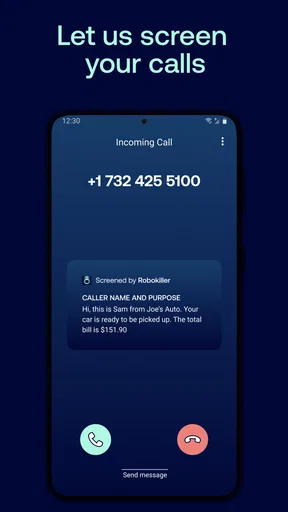
Robokiller is a communication app from Mosaic Srl. Its setup is presented as a guided process, which is helpful if you do not usually adjust call-filtering tools. The important decision is not merely whether to turn blocking on; it is how much filtering you want. A strict approach can reduce interruptions, while a more cautious one may be better if you regularly expect calls from unfamiliar people.
For readability, I would treat the app’s call history and settings as practical tools rather than something to check constantly. Reviewing a blocked call after a missed delivery or an appointment request is more useful than trying to inspect every alert as it happens. If you find a call you expected, use the available controls to adjust how similar calls are handled. That small review habit helps keep filtering from becoming a black box.
The app is free to install and is rated for Everyone. It has a 3.9 average from around 124,000 ratings, and more than five million installs. Those figures suggest a substantial user base, but they do not tell me whether it will identify every unwanted caller correctly; no filtering decision should replace checking a voicemail or following up on an expected call.
Motor and sensory considerations
A call blocker can help when answering the phone quickly is difficult, or when frequent rings make it hard to stay focused. Robokiller’s main value is reducing the number of calls that demand an immediate choice. That can be especially welcome when your hands are occupied, you are using your phone in a noisy place, or repeated interruptions make it harder to concentrate.
There is a trade-off: setting up call controls requires attention and a few deliberate choices. If navigating menus is tiring, make changes when you have time rather than while a call is coming in. I would start with a less aggressive filtering choice, then review the results before tightening it. That approach lowers the chance that a useful call is caught in a setting you chose in a hurry.
People who rely on calls for work, care, appointments, or services should be particularly careful with broad unknown-number blocking. A legitimate caller may not be saved in contacts, and a filter can make it easier to miss that call. Keeping an eye on call history and checking messages gives you a second route back to people who did not get through.
Worth Reading Before You Choose

EA SPORTS FC Mobile 26 Is a Bigger Football Game, but It Takes Time

Flipboard Shows What News Apps Must Do Beyond the Feed

Switching to Android Auto Means Rethinking Your Driving Routine

Google Calendar Makes a Crowded Week Easier to Manage

Ludo King Makes the Most of the Minutes Between Plans

Baby Panda World Brings Quick Play to Modern Phones, but Its Game Library Feels Busy
Using it in everyday situations
Picture waiting for a call from a clinic while several unfamiliar numbers have been ringing throughout the week. A sensible routine is to avoid blocking every unknown number at once, check whether the app has identified a call as unwanted, and review missed calls after the appointment window. If a call is important, you can respond through a callback or another channel rather than assuming that every unknown number is safe—or that every filtered one was spam.
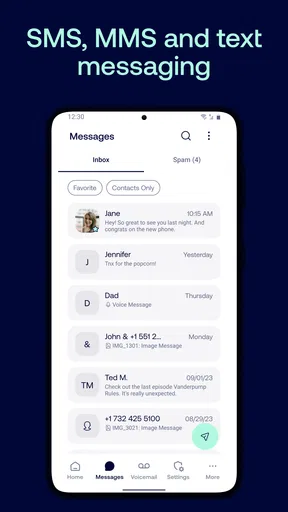
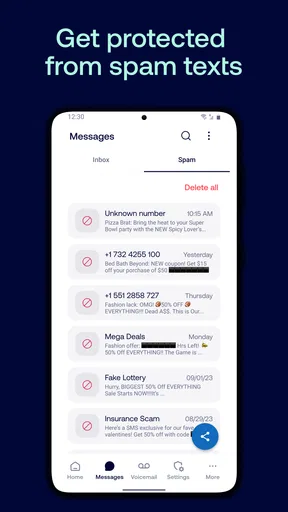
The same care applies to texts. Robokiller’s store summary describes protection against scam messages as well as calls, and its short description says to use it as the default SMS app. That choice matters: anyone considering it for text filtering should check how changing the default messaging app fits their normal workflow before relying on it. If you prefer your existing SMS app, or depend on its familiar layout, the call-blocking benefit alone may not justify changing how you handle messages.
Compared with a phone’s built-in call-screening or blocking controls, a dedicated app can offer a more focused place to manage unwanted contact. Built-in tools may be a better first step for someone who only receives occasional spam and wants to avoid changing defaults or learning another interface. Robokiller makes more sense when nuisance calls are frequent enough that you are willing to review its decisions and adjust your approach.
Where filtering can create friction
Filtering is never the same as certainty. Numbers can be misidentified, and unwanted callers can still get through. I would not treat a reduction in interruptions as proof that every call is safe, or assume a blocked call is unimportant. For an expected call from an unfamiliar number, leave room for it to reach you or make a habit of checking for a message afterward.
There is also a practical privacy and control question whenever an app is asked to help manage communications. Before completing setup, read each permission prompt and consider whether the requested access makes sense for the features you intend to use. If you are not comfortable changing call or SMS handling, use your phone’s existing controls instead. That is a reasonable choice, not a failure to use the app properly.
Robokiller is currently at version 24.7.7 and requires Android 10 or later. The app is free, with in-app purchases ranging from $0.99 to $129.99 per item. I would check the purchase screen carefully before committing to anything, and compare the available options with how often you actually need protection. Occasional nuisance calls may not warrant spending money; persistent disruption makes a trial of the tools more compelling, as long as the terms shown in the app suit you.
Getting Started with Robokiller
First things first, downloading Robokiller - Spam Call Blocker from your app store of choice is a breeze. It’s available for both Android and iOS, so no one's left out. Once installed, the setup was pretty straightforward. You’ll need to grant the app permission to manage calls and access your contacts. Seems a bit intrusive, but it’s necessary for the magic to happen.
The app’s interface is clean and user-friendly. I found everything I needed right from the get-go. It walks you through the setup with easy-to-follow instructions, and within a few minutes, you’re ready to tackle those unwanted calls.
Features That Stand Out
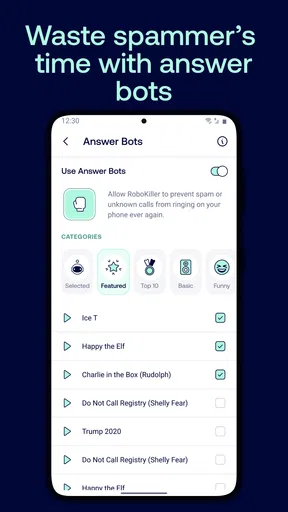
What sets Robokiller apart are its powerful features. The app doesn’t just block spam calls; it fights back with Answer Bots. These are pre-recorded messages that mess with the spam callers and waste their time. It’s oddly satisfying to know that while I’m enjoying my day, a robocaller is stuck talking to a bot.
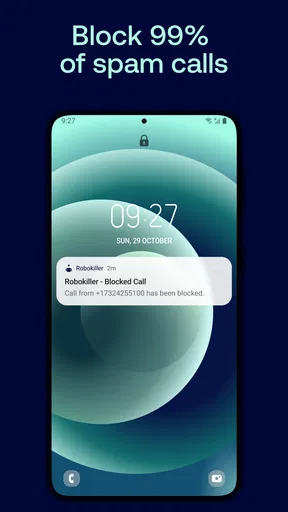
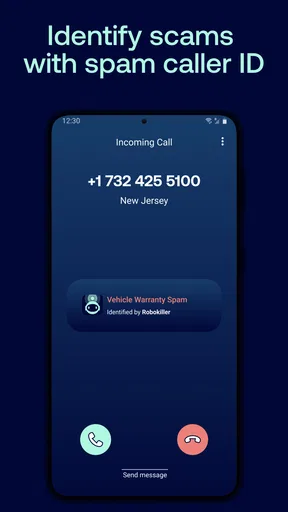
Another cool feature is the real-time call blocking. The app uses a database of known spam numbers and updates regularly to keep your phone safe. You can also manually block numbers and report new ones, which helps make the app even more effective.
Call Management and Customization
I was impressed with the level of customization available in Robokiller. You can tailor the app’s settings to suit your preferences. For instance, you can choose to block all unknown numbers or just the ones identified as spam. There’s also a handy feature that lets you create a whitelist, ensuring important calls always get through.
The app also provides detailed insights into blocked calls, complete with caller ID and reason for blocking. It’s a nice touch that gives you visibility into the app’s performance.
Does It Really Work?
So, does Robokiller deliver on its promises? In my experience, absolutely. The number of spam calls I received dropped significantly. It’s like having a personal bodyguard for your phone. And those Answer Bots? They bring a sense of justice to the whole experience.
However, it’s not all sunshine and rainbows. Occasionally, a spam call might sneak through, and sometimes legitimate calls might be flagged. But these instances were rare and easily manageable with the app’s settings.
Is It Worth It?
Robokiller offers a free trial, which is perfect for dipping your toes in the water. After that, there’s a subscription fee, but considering the peace of mind it provides, I’d say it’s worth every penny.
For anyone plagued by spam calls, Robokiller is a game-changer. It’s effective, easy to use, and even a bit fun. If you’re tired of dodging unwanted calls, give Robokiller a try. You might find it’s the app you didn’t know you needed.
Who is likely to benefit most?
I would recommend it first to people whose phones ring often with sales pitches, suspicious calls, or repeated attempts from numbers they do not recognize. The benefit is not only fewer interruptions; it is having a place to inspect what was filtered and decide whether the app’s choices match your needs. Someone who receives only a rare spam call may get enough protection from the phone’s built-in blocking tools and prefer not to add another app.
It may also suit people who are comfortable reviewing settings and adapting their habits. The strongest setup is not necessarily the strictest one. A person who receives calls from new clients, couriers, schools, or service providers should preserve a path for unknown callers, while someone who rarely needs to hear from new numbers may choose a firmer filter. The right balance depends on the cost of missing a legitimate call in your own routine.
A practical way to evaluate it
Rather than turning on every available restriction at once, I would start with the filtering level that feels least disruptive, then observe how the phone behaves over several days. When a call you expected does not arrive, check the call history before assuming the caller never tried. If you discover a false positive, adjust the settings or whitelist the contact where appropriate. This gradual approach is more informative than judging the app after one busy afternoon.
Answer Bots add a distinctive element compared with a simple block list, but they are not the main reason every person should choose the app. If you mainly want quiet and do not care about the app’s extra handling, basic blocking may be enough. If you find the idea of diverting unwanted callers appealing, the bots make Robokiller feel different from a standard phone setting. Either way, I would keep expectations realistic: filtering can reduce nuisance, not erase it.
Choosing with confidence
One question many users have is whether they need to make it the default SMS app. The store summary explicitly recommends that setup for text protection. If your priority is only unwanted calls, think through that messaging change before enabling it; if scam texts are a concern too, consider whether you are willing to use a different default and become familiar with its controls. The decision should follow your everyday habits, not a desire to switch every setting just because the option is there.
Another reasonable question is whether to pay. The app is free to download, but in-app purchases are offered. I would first work out whether its call handling solves a recurring problem, then inspect the purchase terms presented in the app before buying. A person with infrequent spam may not see enough benefit, while someone losing time to repeated interruptions may value a more dedicated tool. Avoid treating a trial or purchase as a substitute for checking what is included and how billing works.
An inclusive verdict
For accessibility in everyday use, the clearest advantage is reducing how often a person must react to unwanted calls. The key limitation is that a filter can also create uncertainty, especially for people who depend on unfamiliar callers or find settings difficult to navigate. I would use a measured configuration, check call history when something important is expected, and keep another way to contact essential services. That combination makes the app more useful without asking it to make every communication decision on your behalf.
Pros
- Effective at blocking spam calls.
- User-friendly interface.
- Customizable blocking settings.
- Reduces unwanted call interruptions.
- Positive user reviews.
Cons
- Subscription required for full features.
- Occasional false positives.
- Limited free trial period.
- May drain battery life.
- Requires constant internet connection.
FAQs for Robokiller - Spam Call Blocker
What is Robokiller, and how does it work to block spam calls?
Robokiller is an advanced spam call blocker app designed to reduce unwanted calls by utilizing a combination of predictive call blocking technology and a vast database of known spam numbers. It intercepts suspicious calls before they reach your phone, providing peace of mind and reducing interruptions. The app also features an Answer Bot that can waste the time of telemarketers, further dissuading them from calling.
Is Robokiller effective in blocking all spam calls and robocalls?
While Robokiller is highly effective, no app can guarantee 100% protection against spam calls. However, Robokiller’s extensive database and predictive algorithms significantly reduce the number of unwanted calls. Users can also report new spam numbers, which helps improve the app's effectiveness over time by updating its database with the latest threats.
Does Robokiller affect the performance of my phone or battery life?
Robokiller is designed to run efficiently in the background without significantly impacting your phone’s performance or battery life. It uses minimal resources while actively scanning incoming calls. Users generally report no noticeable changes in their device’s performance, making it a reliable choice for spam call blocking without compromising device efficiency.
How does the subscription model work, and is there a free trial available?
Robokiller operates on a subscription model with monthly and annual plans available. The app often offers a free trial period for new users, allowing them to explore its features and assess its effectiveness before committing to a subscription. Subscriptions provide access to premium features and continuous updates to the spam call database.
Can Robokiller access my contacts, and is my data secure?
Robokiller requires access to your contacts to function effectively, ensuring that legitimate calls are not blocked. The app prioritizes user privacy and employs robust encryption measures to protect your data. User information is not shared with third parties, and the app complies with data protection regulations to maintain user trust and security.


